
Not everyone wants live TV on the living room screen. Maybe you work from home and like the news on in a corner of your monitor, or you have a laptop in the kitchen. Good news: 4K Live IPTV runs nicely on Windows and Mac, and you have several free apps to choose from. Here are four options, from the easiest to the most flexible.
Quick Comparison
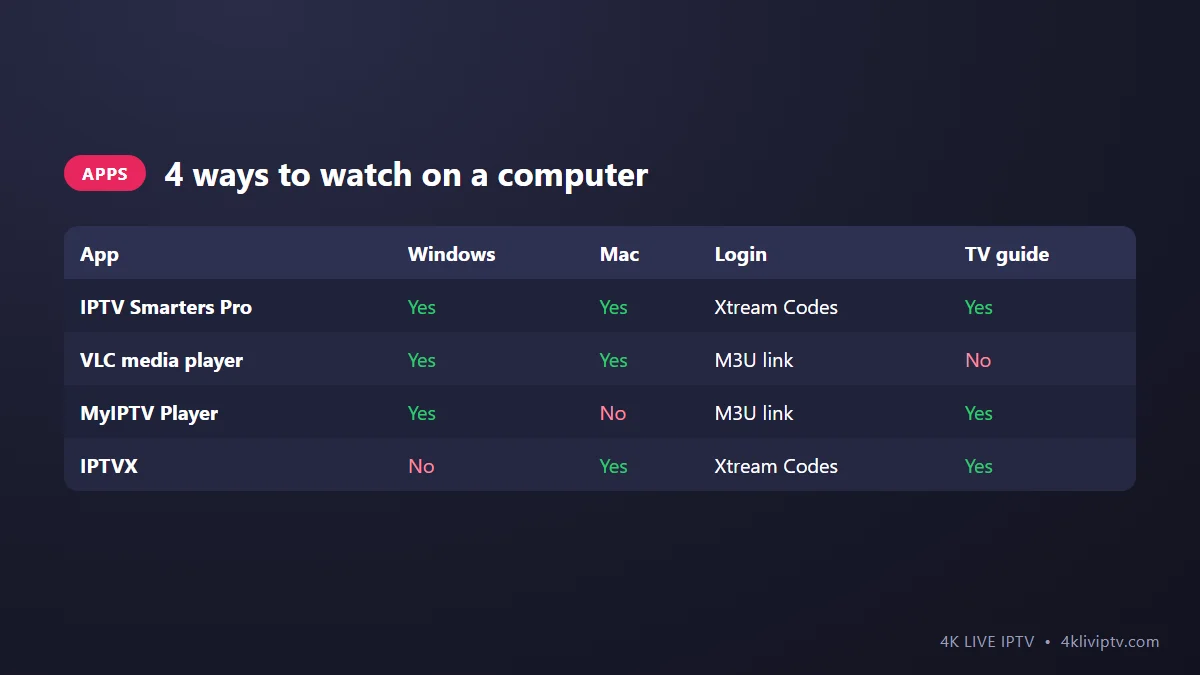
- Want it to look like a TV app? Use IPTV Smarters Pro (Windows or Mac) or IPTVX (Mac).
- Want something you probably already have installed? VLC works with a single link, but without a proper TV guide.
- On Windows and want a guide for free? MyIPTV Player from the Microsoft Store is a good middle ground.
Option 1: IPTV Smarters Pro for Windows and Mac
This is the same app many people use on phones and Android boxes, in a desktop version.
- Download IPTV Smarters Pro for Windows or macOS from the official IPTV Smarters website. Avoid random download sites.
- Install and open it, then choose Login with Xtream Codes API.
- Paste your 4K Live IPTV username, password and server URL. Click Add User.
- Wait for the channels and guide to load, then open Live TV.
The menus are identical to the mobile version, so our IPTV Smarters Pro setup guide applies here too, including the best settings to change.
Option 2: VLC Media Player (Windows and Mac)
VLC is free, light, and plays just about anything. It does not have a nice TV guide, but if you just want to open a channel quickly, it is hard to beat.
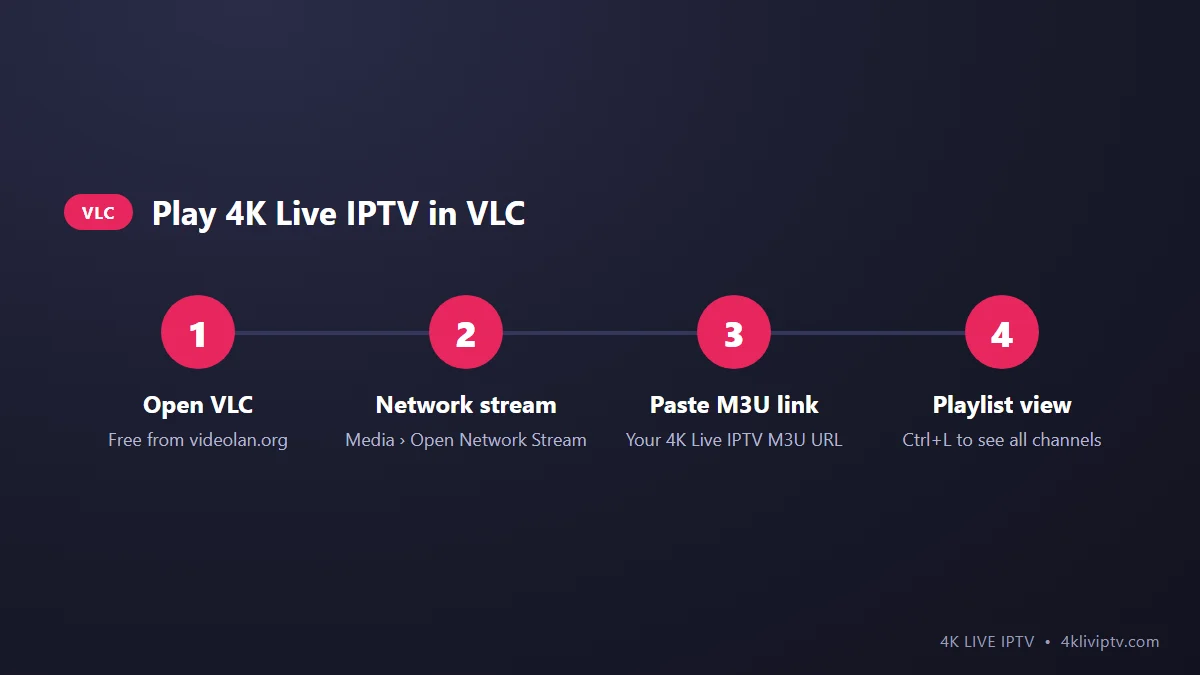
- Install VLC from the official site, videolan.org.
- Open VLC and go to Media › Open Network Stream (on Mac: File › Open Network).
- Paste your 4K Live IPTV M3U link and click Play.
- Press Ctrl+L (Cmd+L on Mac) to open the playlist and see all channels. Double-click one to play it.
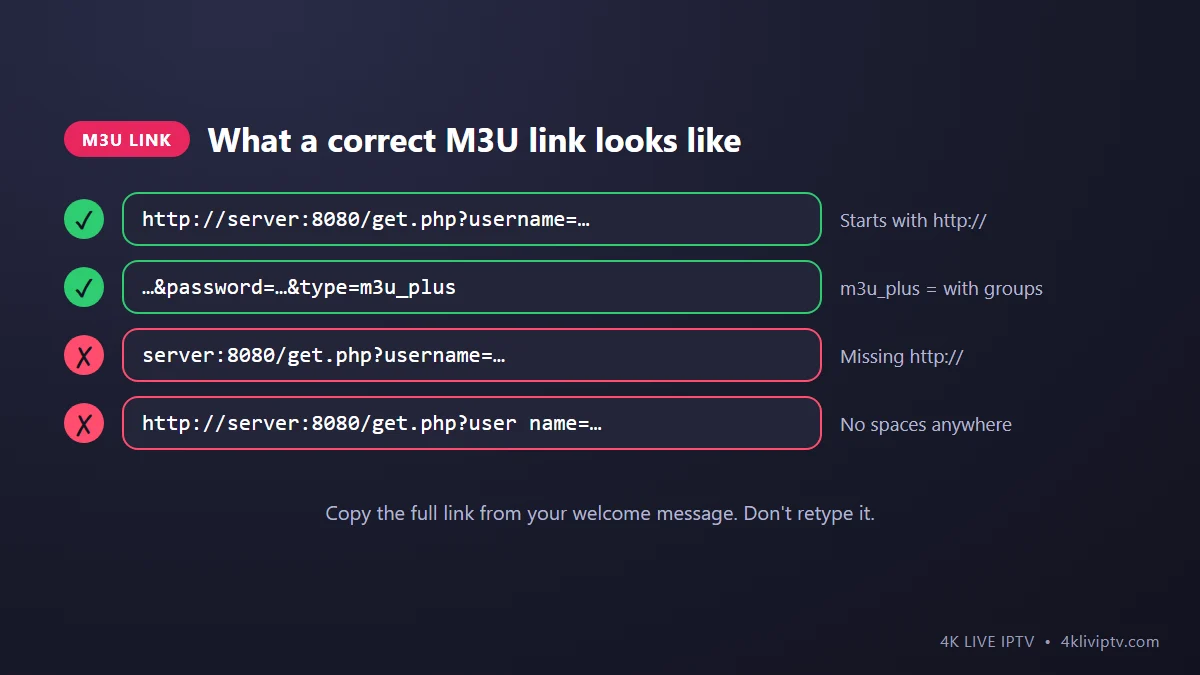
Your M3U link is a long web address that contains your username and password. It is in your welcome message, or our support team can send it to you. Copy the whole thing in one go. A missing character at the end is enough to break it.
Tip: the full playlist is large, so VLC may take a moment to load it. Once it has, use the search box at the top of the playlist window to find a channel by name. Not sure what an M3U link is? Read M3U vs Xtream Codes.
Option 3: MyIPTV Player (Windows)
MyIPTV Player is a free app in the Microsoft Store that adds what VLC lacks: channel groups, favorites and an EPG (TV guide).
- Open the Microsoft Store, search for MyIPTV Player and install it.
- Go to Settings › Add new playlist and EPG source.
- Give it a name, paste your M3U link in the remote channel list field and click Add remote list.
- Back in Settings, select that playlist under “Select channel playlist” and click Refresh.
- Go to Channels and start watching.
Option 4: IPTVX (Mac)
On a Mac, IPTVX is the most polished option. It is a paid app from the Mac App Store, and if you already own it on iPhone or Apple TV the purchase usually covers the Mac too. Add a playlist, choose Xtream Codes and enter your details. It has a great TV guide, favorites and picture-in-picture so you can keep a game running while you work. We cover it in more detail in our Apple TV guide.
Watching on Your TV From a Laptop
Any laptop with an HDMI port (or a USB-C to HDMI adapter) can turn into a TV box:
- Connect the laptop to the TV with an HDMI cable.
- On Windows, press Windows + P and choose “Second screen only” so the TV becomes the main display.
- Play the channel in full screen (F in VLC, or double-click the video in most apps).
It works well, but for everyday use a $30 to $60 streaming stick is more convenient. See our Firestick guide.
Tips for Smooth Playback on a Computer
- Use a cable if you can. Laptops on Wi-Fi in another room are a common source of freezing. Our buffering guide explains why.
- Close heavy tabs and apps. A browser with 40 open tabs and a 4K stream compete for the same memory.
- Keep hardware acceleration on in VLC (Tools › Preferences › Input/Codecs) so the graphics chip decodes the video, not the processor.
- 4K needs a 4K screen. On a standard 1080p laptop screen, the Full HD version of a channel looks the same and uses less bandwidth.
Frequently Asked Questions
Can I watch 4K Live IPTV in a web browser?
Not directly in a normal browser tab. Use one of the apps above. They are free (except IPTVX) and much more reliable.
Does watching on my PC use one of my connections?
Yes. Each device playing a stream at the same time counts as one connection on your 4K Live IPTV plan.
VLC says “Your input can’t be opened”. What now?
The link is almost always incomplete or has a typo. Copy it again from your welcome message, paste it, and make sure it starts with http://. If it still fails, check that your subscription is active.
Is VLC safe to use?
Yes, as long as you download it from videolan.org. It is free, open-source software used by millions of people.
Wrapping Up
For a TV-style experience on your computer, use IPTV Smarters Pro (or IPTVX on Mac). For a quick, no-fuss stream, paste your M3U link in VLC. Either way, your 4K Live IPTV channels are a few clicks away. If a link or login won’t work, send our team a screenshot on WhatsApp and we will check it with you.
Need help with your IPTV?
Our team is available 24/7 to help you install and use your subscription on any device.
CONTACT US ON WHATSAPP